Every student deserves to lead, design, and create in computer science and electronics—regardless of physical, visual, or sensory barriers. The Co-Pilot Model is a collaborative, team-based learning approach that ensures equal access to STEM concepts by separating physical manipulation from cognitive design and programming logic.
STEM/STEAM activities can be especially difficult to adapt due to small parts, hard-to-read labels, and color-coded electronic components. To help overcome these barriers, we recommend the strategies outlined below.
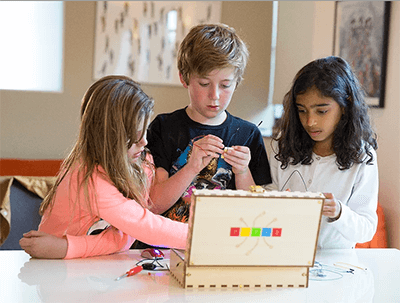
| The Team | |
|---|---|
| Pilot (Architect / Lead) | Co-Pilot (Executive Partner) |
|
|
The student who needs fine-motor or visual accommodations serves as the Pilot. The Pilot makes 100% of the cognitive decisions—determining which GPIO pins to use, designing the Blockly programming logic, solving puzzles, and directing where physical connections belong.
A peer, educator, or classroom assistant acts as the Co-Pilot. The Co-Pilot carries out physical wire placements, describes visual-only screen elements, or assists with fine-motor assembly under the explicit direction of the Pilot.
In general classroom settings, encourage all student pairs to practice Pilot and Co-Pilot roles. This builds empathy, strengthens communication skills, and normalizes collaborative execution.
For independent work when a Co-Pilot is unavailable, pair your lesson plans with digital circuit simulators (such as Tinkercad Circuits or PhET Interactive Simulations). Students can design and test their circuit logic on-screen before or alongside physical assembly.
Because Story Mode maps built physical circuits directly to standard keyboard events, students can use adaptive USB switches, foot pedals, or alternative input devices to control game actions.
Piper Make is accessed through a browser such as Chrome, Edge, or Opera. Each of these browsers has built-in accessibility features and native compatibility with screen readers. Students can use zoom, contrast adjustments, translation, and other browser settings to customize their experience.
Wires, components, and hardware can be adapted for easier manipulation by adding masking-tape tabs to components or wire ends. Labels can also be written on the tabs to assist low-vision or color-blind students. The included screwdriver can be swapped for a larger #1 Phillips screwdriver with an ergonomic handle for students with limited dexterity. Additionally, masking tape can hold hardware pieces in place during building steps to simplify assembly.
| Student Need | Co-Pilot Adaptation | Complementary Tool |
|---|---|---|
| Fine-Motor / Limited Dexterity | Pilot specifies pin coordinates (e.g., "Connect Pin 14 to Ground"); Co-Pilot places the jumper wire. | Adaptive USB switches, oversized button interfaces |
| Visual Impairment / Blindness | Co-Pilot reads dialogue and describes on-screen block layouts; Pilot dictates coding blocks and circuit logic. | External HDMI display, audio description / partner narration |
| Neurodiverse / Executive Function | Co-Pilot manages step-by-step physical part sorting; Pilot focuses on logical execution and programming. | Step-by-step visual blueprint sheets, checklist guides |
For visually impaired students who use screen readers, all of our blueprints are available in a digital format featuring detailed, alt-text descriptions for every step:
Piper Blueprints - Online ViewerThe Piper Computer Kit interface can be set to English, Spanish, French, Mandarin Chinese, or Japanese in the Story Mode settings menu.
Piper Make displays in English by default. Except for the coding blocks and toolbox, you can use your browser's (Chrome, Edge, Opera) translation settings to automatically translate tutorials and page text into any supported language.
We recommend downloading the PDF version of any guide from the Piper Blueprints - Online Viewer (click the download icon in the lower-right corner) and using Google Translate Document Upload to convert it into your preferred language.
Need a custom accommodation or modified teacher guide? If a lesson plan or building step requires a specific accessibility adaptation or correction for your classroom, please contact our team at hi@playpiper.com.
Informational Purposes Only: The accessibility documentation, Voluntary Product Accessibility Templates (VPAT®), and Accessibility Conformance Reports (ACR) provided on this site are published by Play Piper LLC ("Company") for informational purposes only to assist educators and institutions in evaluating the accessibility of Play Piper products, including the Piper Computer Kit and Piper Make (collectively, the "Products").
No Warranties: Accessibility assessments reflect the Company’s evaluation of the Products as of the date indicated on each report. Information on this site and within any ACR is provided "as is" without warranty of any kind, express, implied, or statutory, including but not limited to warranties of accuracy, completeness, merchantability, fitness for a particular purpose, or non-infringement. Nothing herein constitutes a guarantee that any Product fully conforms to any specific accessibility standard.
Scope & Operating Limitations: Accessibility performance may vary based on testing methodologies, hardware configurations, classroom environments, operating systems, browser extensions, and assistive technologies outside the Company’s control. The Company does not warrant that Products will be accessible in all user configurations or compatible with every assistive technology. Product characteristics may change due to ongoing software updates, and the Company assumes no obligation to update published ACRs immediately following software modifications.
Third-Party Components & Limitation of Liability: This information does not constitute legal advice or a binding contractual commitment regarding compliance with any accessibility law or regulation (such as Section 508 or ADA Title II). The Company makes no representations regarding third-party platforms, browsers, software, or external components referenced in our guides. To the fullest extent permitted by applicable law, Play Piper LLC and its officers, directors, employees, and agents shall not be liable for any damages arising out of or in connection with the use of or reliance upon any accessibility information provided herein.
